8 月 222009
 

What you can do with GPS Logger?

  • Record your movement (as long as you take your BB with you) 😉
  • Display current Position:
    • Longitude / Latitude
    • accuracy for Longitude & Latitude values
    • # of Satellites
    • current altitude (in WGS84)
    • current course/heading
    • current speed [Ø speed (if available)]
    • travel distance
    • travel time
  • While recording you can mark your current position and specify a note/remark for it
  • While recording you can pause & resume the recording
  • Copy your current location data [Lon|Lat|Alt] into the Clipboard to be able to paste it in a SMS or eMail (or where ever you like) Continue reading »

8 月 222009
 

GPS Logger[100% free 100% offline]
A straight forward application, to record your movement with your BlackBerry® device over time
+ Simple Geocache Application for BlackBerry® devices
+ Outdoor Navigation

I would like to present an application that I have written for all BlackBerry® devices with OS 4.2.1 or higher [successfully tested by other users and myself with 8100, 8310, 8800, 8820, 8900, 9000, 9500, 9530 & 9630].

GPSLogger is a pretty straightforward application. It records your physical movement on your BB device over time, including elevation, speed, and some additional data. GPSLogger can also direct you to a location that you either entered manually or have previously recorded. This is the "Guide me Home" function, which makes GPSLogger usable for Geocaching. As extended functionality to the "Guide Me Home" feature since v1.5 a very easy to use outdoor navigation is integrated into GPSLogger also.

The most important aspect of GPSLogger is that it will work 100% offline – no data will be transferred while you use it.

Core Features of GPSLogger

  • Record your movement over time – the following values will be stored:
    • longitude / latitude
    • accuracy for longitude & latitude values
    • # of satellites
    • current altitude (in WGS84)
    • current course/heading
    • current speed
    • name of location (if specified) Continue reading »
8 月 142009
 

The latest BlackBerry® smartphones come equipped with cameras that include a digital zoom function, a built-in flash and lighting options. They're perfect for capturing spur-of-the-moment events. In this issue of BlackBerry® Connection®, we show you how to take better pictures—and avoid common mistakes—plus provide some additional tips on how to organize, share, and edit your images.

1. Get Closer

While you can capture panoramas with your camera, you'll take the best possible photos by getting close to your subject matter. Go ahead and take a few extra steps toward what you're shooting—the images you capture will be much more engaging.


Don't worry about getting an entire person—or animal—in the frame. In the picture on the right, we got in close and captured an image with a much different feel than the one on the left.

2. Hold Steady

Camera shake is the primary reason for blurry photos, whether you're using a cameraphone or a digital SLR. To capture a crisp, clear image, hold your smartphone with two hands or use one hand to brace your arm. If possible, hold your smartphone on top of a desk or other object to reduce camera shake. Continue reading »
8 月 142009
 

这些天一直在搞移动基站的电磁辐射监测,所以晚上无聊就拿仪器测了测自己手机的电磁辐射。

仪器用的是德国narda公司生产的场强仪,对移动基站只做电场强度的测量,超标标准为5.5v/m,对手机用这个仪器是否合适以及是否适用这个标准,这里就不作讨论了,只是给大家一个参考吧。至于为什么不测磁场强度,也许是因为基站和手机的磁场强度都很小,被外部干扰大,所以很难得到一个准确而且有意义的数值,但基站和手机磁场是肯定存在的。

我拿自己的黑莓8110做的一些测试,得出一些结论,当然有些结论别人早就得到的。

第一,接通电话前的瞬间电磁辐射最大。我用仪器贴着手机表面测试结果是接通瞬间电场强度在15-17v/m之间,接通后数值逐渐下降至5-6v/m之间,接到别人拨过来的电话时电场强度最大值只有7-8v/m,是拨出电话时的一半,而后下降至4-6v/m之间。用耳机拨打或者接听电话是耳塞处的电场强度低于1v/m。

第二,晚上睡觉把手机放在脑袋边并没有相象中那么可怕。我将手机处于待机状态,测到的电场强度只有0.1-0.8v/m之间,这个值相对于打电话时的辐射基本可以忽略不计的。而且,在离手机20厘米处电场强度只有0-0.3 v/m,这完全有可能是室内电线产生的辐射。

第三,电磁辐射最大的是手机的GPRS上网。测得在数据交换时(也就是黑莓手机的右上角出现上下箭头时)手机表面的电场强度最大值达到了40v/m,平均值也在16至30之间。根据上网时眼睛与屏幕的距离,将仪器探头放在离手机20厘米时,电场强度也达到了10v/m左右,30厘米时在6-8v/m左右。而我在测移动基站的电场强度时遇到的最大值也不过6v/m。所以,经常拿手机上网对人的电磁辐射是最大的。 Continue reading »

8 月 142009
 

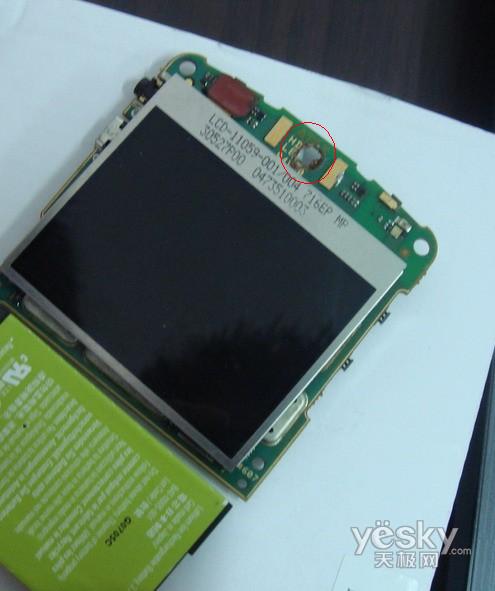
由于黑莓的解码软件的出现,使得黑莓的解码成本大大减少,在网上针对黑莓硬解的讨论越来越少,而打孔机却越来越多,已经成为了硬解的代名词。

然而,硬解和打孔机的质量却有很大的差别。。硬解是通过拆机写字库来破解,而打孔机更恶劣,使用的板是报废板,质量上比硬解的相差太多太多。

(顶部有一个圆孔)

到底什么是打孔机?下面简短的介绍相信会让您一目了然。

首先从手机的产生说起,电路板也叫母版,作为手机上所有元器件的载体,在手机中的地位不言而喻,很多莫名其妙的问题都有可能是主板引起的。现阶段由于手机的功能越来越多,而外形趋向轻薄短小,所以对电路板的发展提出了更好的要求,无论是取材,设计还是主板的工艺,从传统板到HDI高精密度连接板,再从level 1到Level 3,从全板通孔到盲孔,埋孔设计。越来越小的主板承载着越来越多的功能性责任。当然,一直发展的世界电子前列的电路板,尤其是手机板的废品率也是很高的,一般来说,主板供应商都会将在生产流程或者最后的OQC出货检测时不合格的主板报废,为了防止再被居心叵测的人利用,一般都会用机器剪坏主板或者打一个孔,破坏主板内部线路。 Continue reading »